Material.Icons 2.1.5
Material.Icons
Parsed icons set from materialdesignicons.com and display control implementations for different GUI frameworks.
- All icons are always up-to-date because automatically updated every 6 hours.
- Small package size because icons are graphically encoded via SVG Path.
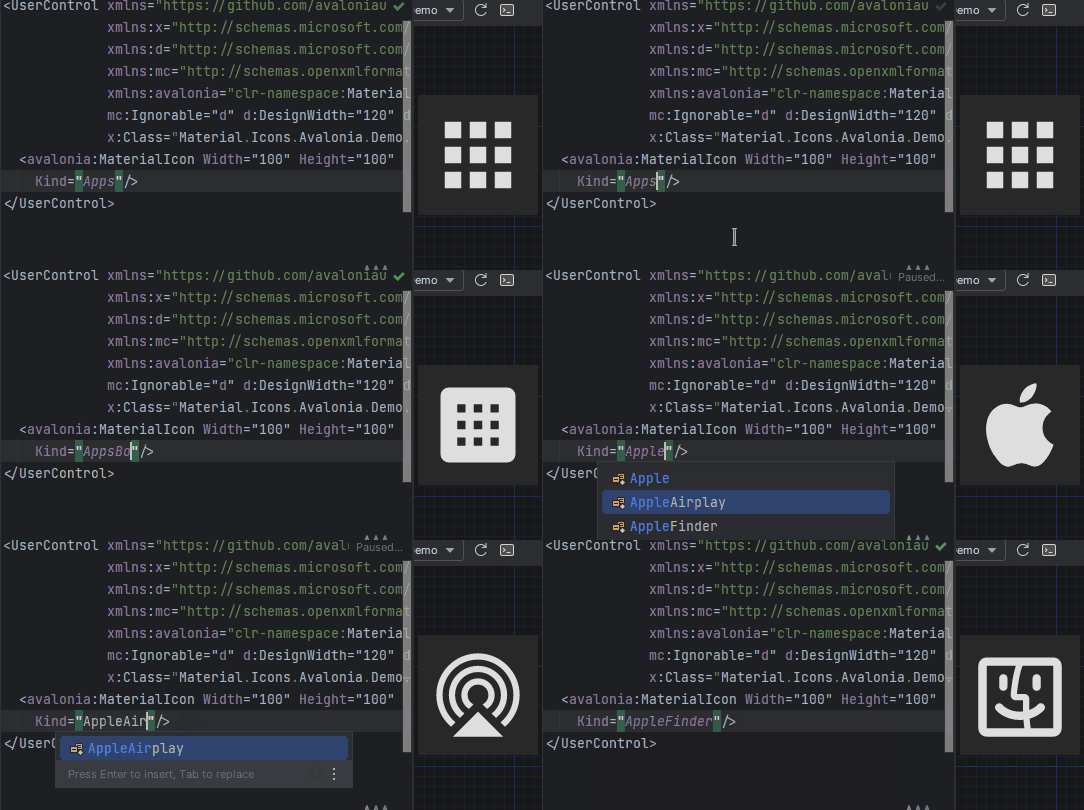
- Icon types are strongly typed enum, so your IDE will suggest available variants:
Structure
This project consists of 3 parts:
contains info about the icons
contains controls for AvaloniaUI
contains controls for WPF
FAQ - frequently asked questions
Avalonia
Getting started
- Install Material.Icons.Avalonia nuget package:
dotnet add package Material.Icons.Avalonia - Include styles in
App.xaml(for2.0.0version and higher):
For<Application xmlns:materialIcons="clr-namespace:Material.Icons.Avalonia;assembly=Material.Icons.Avalonia" ...> <Application.Styles> ... <materialIcons:MaterialIconStyles /> </Application.Styles> </Application>1.*.*:<Application ...> <Application.Styles> ... <StyleInclude Source="avares://Material.Icons.Avalonia/App.xaml" /> </Application.Styles> </Application>


Using
Add Material.Icons.Avalonia namespace to the root element of your file (your IDE can suggest it or do it automatically):
xmlns:materialIcons="clr-namespace:Material.Icons.Avalonia;assembly=Material.Icons.Avalonia"
Use MaterialIcon control:
<materialIcons:MaterialIcon Kind="Abacus" />
The Foreground property controls the color of the icon.
Also, there is MaterialIconExt which allows you to use is as the markup extension:
<Button Content="{materialIcons:MaterialIconExt Kind=Abacus}" />
Avalonia FuncUI (F#)
Getting started
- Install Material.Icons.Avalonia nuget package:
dotnet add package Material.Icons.Avalonia - Import styles in Application (or if you use XAML check instructions for plain Avalonia)
type App() = inherit Application() override this.Initialize() = .. this.Styles.Add(MaterialIconStyles(null)) .. - Create bindings for
MaterialIconnamespace Avalonia.FuncUI.DSL [<AutoOpen>] module MaterialIcon = open Material.Icons open Material.Icons.Avalonia open Avalonia.FuncUI.Types open Avalonia.FuncUI.Builder let create (attrs: IAttr<MaterialIcon> list): IView<MaterialIcon> = ViewBuilder.Create<MaterialIcon>(attrs) type MaterialIcon with static member kind<'t when 't :> MaterialIcon>(value: MaterialIconKind) : IAttr<'t> = AttrBuilder<'t>.CreateProperty<MaterialIconKind>(MaterialIcon.KindProperty, value, ValueNone) - Use
Button.create [
     Button.content (
         MaterialIcon.create [
             MaterialIcon.kind MaterialIconKind.Export
        ]
    )
]
WPF
Getting started
Install Material.Icons.WPF nuget package:
dotnet add package Material.Icons.WPF


Using
Add Material.Icons.WPF namespace to the root element of your file (your IDE can suggest it or do it automatically):
xmlns:materialIcons="clr-namespace:Material.Icons.WPF;assembly=Material.Icons.WPF"
Use MaterialIcon control:
<materialIcons:MaterialIcon Kind="Abacus" />
The Foreground property controls the color of the icon.
Also, there is MaterialIconExt which allows you to use is as the markup extension:
<Button Content="{materialIcons:MaterialIconExt Kind=Abacus}" />
Meta
Getting started
Install Material.Icons nuget package:
dotnet add package Material.Icons


Using
Icon types stored in Material.Icons.MaterialIconKind enum.
We can resolve an icon path by using Material.Icons.MaterialIconDataProvider.GetData().
Adding your own icons
Currently, there is no way to add your own icons, as icons are enum and cannot be modified.
But you can override some existing icons to use your own data:
public class CustomIconProvider : MaterialIconDataProvider
{
    public override string ProvideData(MaterialIconKind kind)
    {
        return kind switch
        {
            MaterialIconKind.TrophyVariant => "some SVG code",
            _ => base.ProvideData(kind)
        };
    }
}

// When your application starts (e.g. in the Main method) replace MaterialIconDataProvider with your own
public static int Main(string[] args)
{
    MaterialIconDataProvider.Instance = new CustomIconProvider(); // Settings custom provider

    // Application startup code
    // return BuildAvaloniaApp().StartWithClassicDesktopLifetime(args);
}
FAQ
How to change icon color?
- Change
Foregroundproperty.
How to change size?
- If you are using
MaterialIconcontrol - useWidthor/andHeightproperties. - If you are using
MaterialIconExt- useSizeproperty.
How to update icons?
- You can manually set
Material.Iconspackage version in your project file.
What about versioning policy?
- We use semver.
Any package with identical major and minor versions is compatible.
For example,1.0.0and1.0.1are compatible, but1.0.0and1.1.0might not be.
Showing the top 20 packages that depend on Material.Icons.
| Packages | Downloads |
|---|---|
|
Material.Icons.Avalonia
Avalonia control for display material icons from Material.Icons
|
2 |
|
Material.Icons.Avalonia
Avalonia control for display material icons from Material.Icons
|
1 |
.NET Standard 2.0
- No dependencies.
| Version | Downloads | Last updated |
|---|---|---|
| 3.0.0-preview6 | 1 | 2026/1/22 |
| 3.0.0-preview5 | 1 | 2026/1/22 |
| 3.0.0-preview4 | 1 | 2026/1/22 |
| 3.0.0-preview3.1 | 1 | 2026/1/25 |
| 3.0.0-preview1.1 | 1 | 2026/1/25 |
| 2.4.1 | 2 | 2026/1/15 |
| 2.4.0 | 1 | 2026/1/22 |
| 2.3.1 | 1 | 2026/1/22 |
| 2.3.0 | 1 | 2026/1/22 |
| 2.2.0 | 1 | 2026/1/22 |
| 2.1.12 | 1 | 2026/1/22 |
| 2.1.11 | 1 | 2026/1/22 |
| 2.1.10 | 1 | 2026/1/22 |
| 2.1.9 | 1 | 2026/1/22 |
| 2.1.8 | 0 | 2024/4/1 |
| 2.1.7 | 1 | 2026/1/22 |
| 2.1.6 | 1 | 2026/1/22 |
| 2.1.5 | 1 | 2026/1/22 |
| 2.1.4 | 1 | 2026/1/22 |
| 2.1.3 | 1 | 2026/1/22 |
| 2.1.2 | 1 | 2026/1/22 |
| 2.1.1 | 1 | 2026/1/22 |
| 2.1.0 | 1 | 2026/1/22 |
| 2.0.18 | 1 | 2026/1/22 |
| 2.0.17 | 1 | 2026/1/22 |
| 2.0.16 | 1 | 2026/1/22 |
| 2.0.15 | 1 | 2026/1/22 |
| 2.0.14 | 1 | 2026/1/22 |
| 2.0.13 | 1 | 2026/1/22 |
| 2.0.12 | 1 | 2026/1/22 |
| 2.0.11 | 1 | 2026/1/22 |
| 2.0.10 | 1 | 2026/1/22 |
| 2.0.9 | 1 | 2026/1/22 |
| 2.0.8 | 1 | 2026/1/22 |
| 2.0.7 | 1 | 2026/1/22 |
| 2.0.6 | 1 | 2026/1/22 |
| 2.0.5 | 1 | 2026/1/22 |
| 2.0.4 | 1 | 2026/1/22 |
| 2.0.3 | 1 | 2026/1/22 |
| 2.0.2 | 1 | 2026/1/22 |
| 2.0.1 | 1 | 2026/1/22 |
| 2.0.0 | 1 | 2026/1/22 |
| 2.0.0-preview1.3 | 1 | 2026/1/25 |
| 2.0.0-preview1.2 | 1 | 2026/1/25 |
| 2.0.0-preview1.1 | 1 | 2026/1/25 |
| 2.0.0-preview1 | 1 | 2026/1/22 |
| 1.1.35 | 1 | 2026/1/22 |
| 1.1.34 | 1 | 2026/1/22 |
| 1.1.33 | 1 | 2026/1/22 |
| 1.1.32 | 1 | 2026/1/22 |
| 1.1.31 | 1 | 2026/1/22 |
| 1.1.30 | 1 | 2026/1/22 |
| 1.1.29 | 1 | 2026/1/22 |
| 1.1.28 | 1 | 2026/1/22 |
| 1.1.27 | 1 | 2026/1/22 |
| 1.1.26 | 1 | 2026/1/22 |
| 1.1.25 | 1 | 2026/1/22 |
| 1.1.24 | 1 | 2026/1/22 |
| 1.1.23 | 1 | 2026/1/22 |
| 1.1.22 | 1 | 2026/1/22 |
| 1.1.21 | 1 | 2026/1/22 |
| 1.1.20 | 1 | 2026/1/22 |
| 1.1.19 | 1 | 2026/1/22 |
| 1.1.18 | 1 | 2026/1/22 |
| 1.1.17 | 1 | 2026/1/22 |
| 1.1.16 | 1 | 2026/1/22 |
| 1.1.15 | 1 | 2026/1/22 |
| 1.1.14 | 1 | 2026/1/22 |
| 1.1.13 | 1 | 2026/1/22 |
| 1.1.12 | 1 | 2026/1/22 |
| 1.1.11 | 1 | 2026/1/22 |
| 1.1.10 | 1 | 2026/1/22 |
| 1.1.9 | 1 | 2026/1/22 |
| 1.1.8 | 1 | 2026/1/22 |
| 1.1.7 | 1 | 2026/1/22 |
| 1.1.6 | 1 | 2026/1/22 |
| 1.1.5 | 1 | 2026/1/22 |
| 1.1.4 | 1 | 2026/1/22 |
| 1.1.3 | 1 | 2026/1/22 |
| 1.1.2 | 1 | 2026/1/22 |
| 1.1.1 | 1 | 2026/1/22 |
| 1.1.0 | 1 | 2026/1/22 |
| 1.0.105 | 1 | 2026/1/22 |
| 1.0.104 | 1 | 2026/1/22 |
| 1.0.103 | 1 | 2026/1/22 |
| 1.0.102 | 1 | 2026/1/22 |
| 1.0.101 | 1 | 2026/1/22 |
| 1.0.100 | 1 | 2026/1/22 |
| 1.0.99 | 1 | 2026/1/22 |
| 1.0.98 | 1 | 2026/1/22 |
| 1.0.97 | 1 | 2026/1/22 |
| 1.0.96 | 1 | 2026/1/22 |
| 1.0.95 | 1 | 2026/1/22 |
| 1.0.94 | 1 | 2026/1/22 |
| 1.0.93 | 1 | 2026/1/22 |
| 1.0.92 | 1 | 2026/1/22 |
| 1.0.91 | 1 | 2026/1/22 |
| 1.0.90 | 1 | 2026/1/22 |
| 1.0.89 | 1 | 2026/1/22 |
| 1.0.88 | 1 | 2026/1/22 |
| 1.0.87 | 1 | 2026/1/22 |
| 1.0.86 | 1 | 2026/1/22 |
| 1.0.85 | 1 | 2026/1/22 |
| 1.0.84 | 1 | 2026/1/22 |
| 1.0.83 | 1 | 2026/1/22 |
| 1.0.82 | 1 | 2026/1/22 |
| 1.0.76 | 1 | 2026/1/22 |
| 1.0.75 | 1 | 2026/1/22 |
| 1.0.74 | 1 | 2026/1/22 |
| 1.0.73 | 1 | 2026/1/22 |
| 1.0.72 | 1 | 2026/1/22 |
| 1.0.71 | 1 | 2026/1/22 |
| 1.0.70 | 1 | 2026/1/22 |
| 1.0.69 | 1 | 2026/1/22 |
| 1.0.68 | 1 | 2026/1/22 |
| 1.0.67 | 1 | 2026/1/22 |
| 1.0.66 | 1 | 2026/1/22 |
| 1.0.65 | 1 | 2026/1/22 |
| 1.0.64 | 1 | 2026/1/22 |
| 1.0.63 | 1 | 2026/1/22 |
| 1.0.62 | 1 | 2026/1/22 |
| 1.0.61 | 1 | 2026/1/22 |
| 1.0.60 | 1 | 2026/1/22 |
| 1.0.59 | 1 | 2026/1/22 |
| 1.0.58 | 1 | 2026/1/22 |
| 1.0.57 | 1 | 2026/1/22 |
| 1.0.56 | 1 | 2026/1/22 |
| 1.0.55 | 1 | 2026/1/22 |
| 1.0.54 | 1 | 2026/1/22 |
| 1.0.53 | 1 | 2026/1/22 |
| 1.0.52 | 1 | 2026/1/22 |
| 1.0.51 | 1 | 2026/1/22 |
| 1.0.50 | 1 | 2026/1/22 |
| 1.0.49 | 1 | 2026/1/22 |
| 1.0.48 | 1 | 2026/1/22 |
| 1.0.47 | 1 | 2026/1/22 |
| 1.0.46 | 1 | 2026/1/22 |
| 1.0.45 | 1 | 2026/1/22 |
| 1.0.44 | 1 | 2026/1/22 |
| 1.0.43 | 1 | 2026/1/22 |
| 1.0.42 | 1 | 2026/1/22 |
| 1.0.41 | 1 | 2026/1/22 |
| 1.0.40 | 1 | 2026/1/22 |
| 1.0.39 | 1 | 2026/1/22 |
| 1.0.38 | 1 | 2026/1/22 |
| 1.0.37 | 1 | 2026/1/22 |
| 1.0.36 | 1 | 2026/1/22 |
| 1.0.35 | 1 | 2026/1/22 |
| 1.0.34 | 1 | 2026/1/22 |
| 1.0.33 | 1 | 2026/1/22 |
| 1.0.32 | 1 | 2026/1/22 |
| 1.0.31 | 1 | 2026/1/22 |
| 1.0.30 | 1 | 2026/1/22 |
| 1.0.29 | 1 | 2026/1/22 |
| 1.0.28 | 1 | 2026/1/22 |
| 1.0.27 | 1 | 2026/1/22 |
| 1.0.26 | 1 | 2026/1/22 |
| 1.0.25 | 1 | 2026/1/22 |
| 1.0.24 | 1 | 2026/1/22 |
| 1.0.23 | 1 | 2026/1/22 |
| 1.0.22 | 1 | 2026/1/22 |
| 1.0.21 | 1 | 2026/1/22 |
| 1.0.20 | 1 | 2026/1/22 |
| 1.0.19 | 1 | 2026/1/22 |
| 1.0.18 | 1 | 2026/1/22 |
| 1.0.17 | 1 | 2026/1/22 |
| 1.0.16 | 1 | 2026/1/22 |
| 1.0.15 | 1 | 2026/1/22 |
| 1.0.14 | 1 | 2026/1/22 |
| 1.0.13 | 1 | 2026/1/22 |
| 1.0.12 | 1 | 2026/1/22 |
| 1.0.11 | 1 | 2026/1/22 |
| 1.0.10 | 1 | 2026/1/22 |
| 1.0.9 | 1 | 2026/1/22 |
| 1.0.8 | 1 | 2026/1/22 |
| 1.0.7 | 1 | 2026/1/22 |
| 1.0.6 | 1 | 2026/1/22 |
| 1.0.5 | 1 | 2026/1/22 |
| 1.0.4 | 1 | 2026/1/22 |
| 1.0.3 | 1 | 2026/1/22 |
| 1.0.2 | 1 | 2026/1/22 |
| 1.0.1 | 1 | 2026/1/22 |
| 1.0.0 | 1 | 2026/1/22 |